• Home
  • Customers
    • MyAccount – Customer Login
    • MyAccount – Register Your Account
    • How to Apply for Water Service
    • Apply for Water Service Online
    • Request a Change in Service
    • Current Rates
    • How to Pay your Bill
    • Sign up for SMS Alerts
    • Frequently Asked Questions
    • Customer Forms
    • Sample of Customer Contract
  • Community
    • Our Service Area
    • Water Quality Facts
    • News and Events
    • Sustainability
  • Company
    • About Cayman Water
    • Our History
    • Our People
    • Jobs / Careers
    • Memberships
    • Technology
  • Contact CW
    • Online Contact Form
    • Report a Problem
    • Request Developer Information
Cayman Water
  • Home
  • Customers
    • MyAccount – Customer Login
    • MyAccount – Register Your Account
    • How to Apply for Water Service
    • Apply for Water Service Online
    • Request a Change in Service
    • Current Rates
    • How to Pay your Bill
    • Sign up for SMS Alerts
    • Frequently Asked Questions
    • Customer Forms
    • Sample of Customer Contract
  • Community
    • Our Service Area
    • Water Quality Facts
    • News and Events
    • Sustainability
  • Company
    • About Cayman Water
    • Our History
    • Our People
    • Jobs / Careers
    • Memberships
    • Technology
  • Contact CW
    • Online Contact Form
    • Report a Problem
    • Request Developer Information

Butterfield

Home Butterfield

Notification to customers paying via Butterfield Bank (Cayman) Limited Online Portal

Due to recent changes made to the Cayman Water KYD and USD bank accounts held with Butterfield Bank (Cayman) Limited effective September 30th, 2023, you are required to DELETE and RE-ADD the Bill Payee for “Cayman Water”. Payments made through to September 29th, 2023 will not be impacted.

Failure to not update the Bill Payee will result in your payment not being processed and may result in disconnection of service.

For any questions, please feel free to contact us at 345-949-4277


TO DELETE A PAYEE

Once logged in to the Butterfield Online Portal
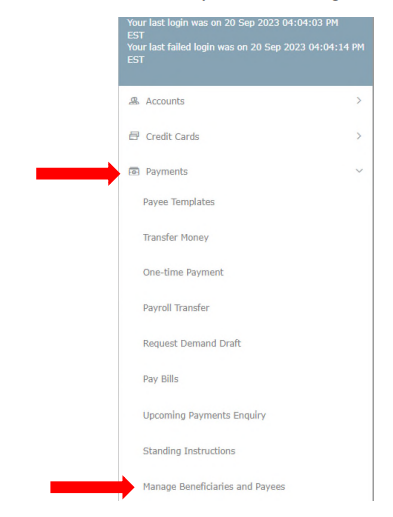
1. Go to the Toggle Menu (they’ll find this to the upper left of screen)


On the Menu
2. Payments > Manage Beneficiaries and Payees


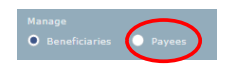
3. Select “Payees” option


4. Find the Category and Expand



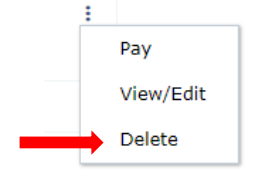
5. Select the 3 dots to the three dots on the right above

6. Then “Delete”


TO ADD A PAYEE

Once logged in to the Butterfield Online Portal
1. Go to the Toggle Menu (they’ll find this to the upper left of screen)


On the Menu
2. Payments > Manage Beneficiaries and Payees


3. Select “Payees” option


4. Add New Payee
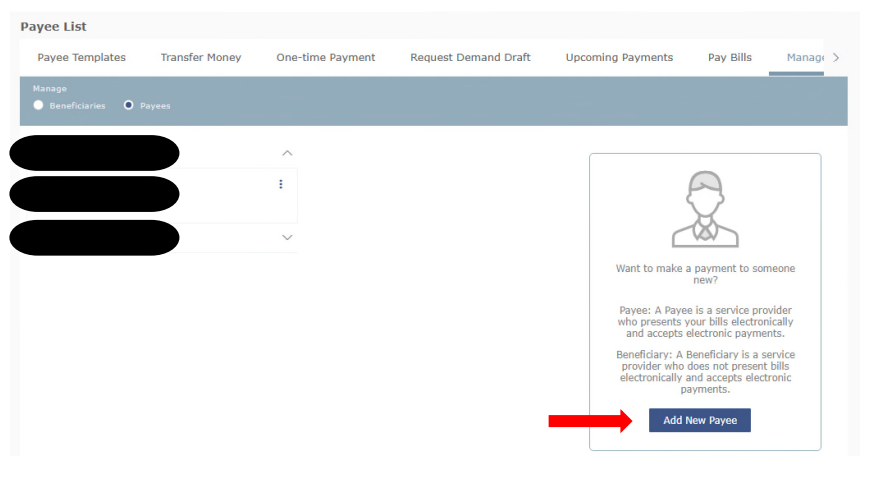


5. Fill out information accordingly
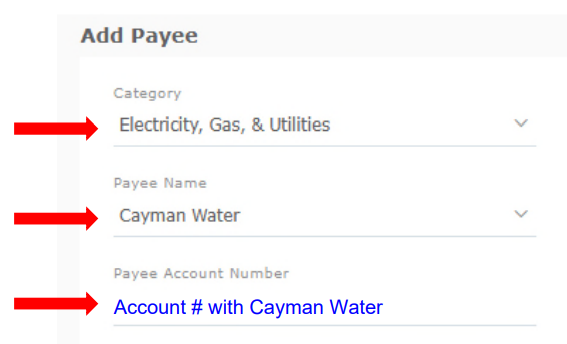


6. Add and Confirm


Bahamas Photos

Bahamas Plants News

Bahamas Plants

    Contact Us

    We're currently offline. Send us an email and we'll get back to you, asap.

    Send Message

    Operating Office Hours:

    Monday to Friday 8:30am to 4:30pm
    Phone contact: 945-4277
    After Hours Emergency Contact:
    Phone contact:945-4347
    CLOSED ON ALL PUBLIC HOLIDAYS.

    Search caymanwater.com

    © 2026 · CaymanWater.com

    • Home
    • Contact Cayman Water
    • MyAccount Customer Login